
WhatsApp Web makes messaging on a computer quick and convenient by mirroring your phone’s WhatsApp account. By design, the first login requires scanning a QR code for security reasons. However, there are practical ways to avoid scanning the QR code every time—especially on trusted devices.
Method 1: Stay Signed In on Trusted Browsers
Step 1: Open WhatsApp Web
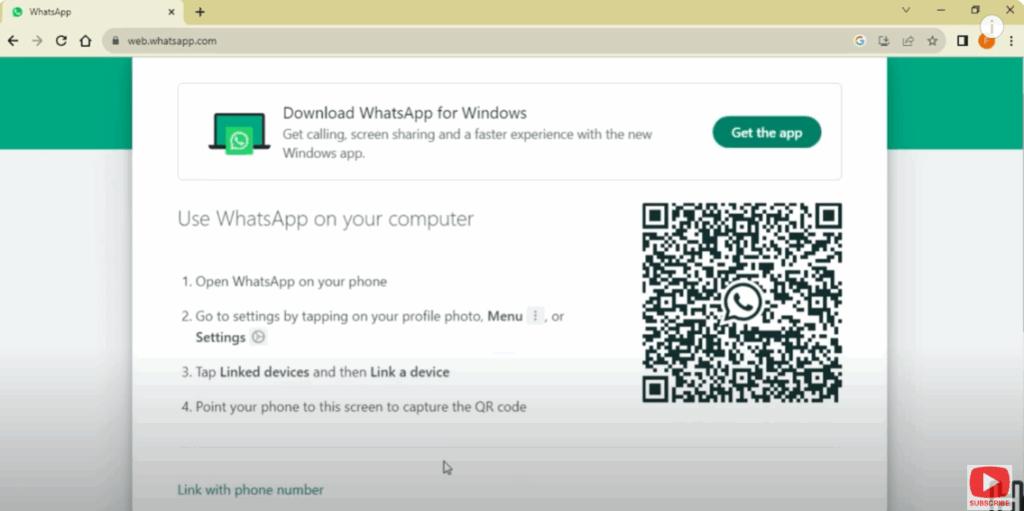
- On your computer, go to 👉 web.whatsapp.com.
- You’ll see a QR code on the screen.
✅ Step 2: Open WhatsApp on Your Phone
- Open WhatsApp app on your phone.
- Tap on Menu (⋮) → Linked Devices → Link a Device.
✅ Step 3: Scan the QR Code (First Time Only)
- Use your phone to scan the QR code shown on your PC/laptop.
- This will log you into WhatsApp Web.
✅ Step 4: Select “Keep Me Signed In”
- Before scanning, make sure you tick “Keep me signed in” on the PC browser.
- This prevents logging out after closing the browser.
✅ Step 5: Stay Logged In
- Don’t log out manually from WhatsApp Web.
- Don’t clear your browser cache or cookies.
- Next time you open WhatsApp Web on the same browser, you’ll be logged in without scanning the QR code again.
✅ Step 6: Use Multi-Device Feature (Optional)
Just ensure you use your linked session regularly (it may auto-log out if inactive for 14 days).ing is needed for re-connection, provided your session remains valid.
WhatsApp now allows multiple devices to stay logged in.
Even if your phone is offline, WhatsApp Web continues to work.
Final Word
- You must scan the QR code at least once—this step cannot be bypassed.
- Once authenticated, “Keep me signed in” and multi-device support let you avoid rescanning.
- Developers can use Puppeteer or IndexedDB scripts—but remember to prioritize security.






