
Is Microsoft Edge forgetting your logins every time you visit a website? That can be really frustrating—especially when you have to type your username and password again and again. This issue usually happens because of browser settings, cookies, or problems with saved passwords. The good news is, you can fix it quickly with a few simple steps. In this blog, we’ll guide you through easy ways to make Edge remember your logins, so browsing becomes smooth and hassle-free again!
1. Turn On Password and Autofill Settings
- Open Microsoft Edge
- Click on the 3 dots (⋯) at the top right → Select Settings
- Go to Profiles
- Click Passwords
- Make sure the following options are enabled:
- Offer to save passwords
- Sign-in automatically
✅ Now Edge should start prompting you to save passwords again.
2. Check Cookies Settings (Don’t Block Them)
- In Edge Settings, go to Cookies and site permissions
- Click Manage and delete cookies and site data
- Ensure these are turned OFF:
- Block third-party cookies
- Clear cookies and site data when you close all windows
If these are ON, Edge deletes login data every time you close it — causing lost logins.
3. Turn Off “Clear on Exit” Feature
- Go to Settings
- Select Privacy, search, and services
- Scroll to Clear browsing data on close
- Make sure Passwords, Cookies, and Sign-in data are not selected
This will prevent Edge from removing login data automatically.
4. Repair Microsoft Edge (Windows Setting)
If the above steps don’t work, repair Edge:
- Press Windows + I to open Settings
- Go to Apps > Installed Apps
- Search Microsoft Edge
- Click Modify
- Select Repair
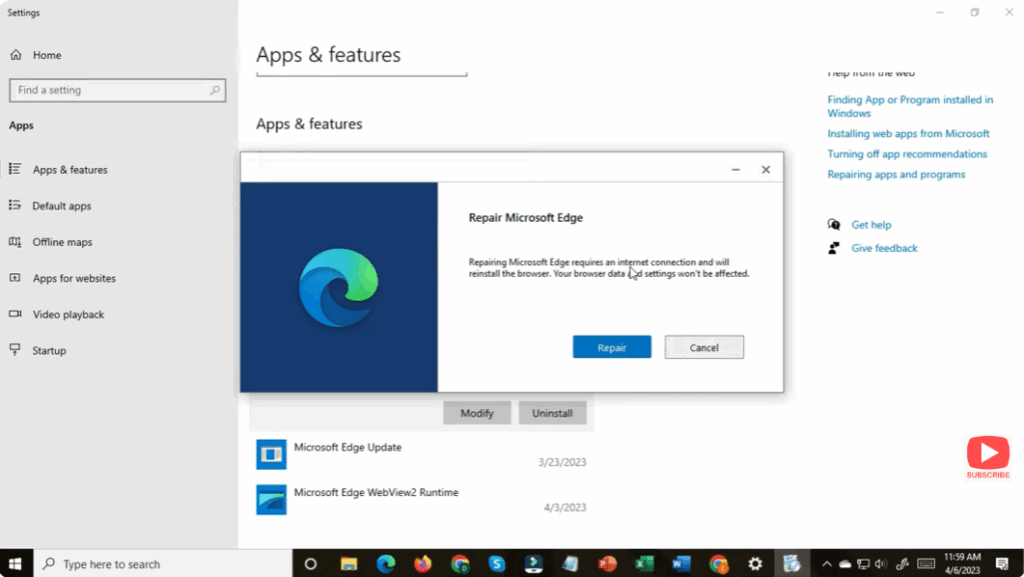
Windows will reinstall Edge components without deleting your data.
5. Reset Edge Browser (If Still Not Working)
⚠️ This will reset browser settings — but your bookmarks and passwords stay safe if sync is enabled.
- Go to Settings
- Click Reset settings
- Select Restore settings to their default values
- Click Reset
Now restart your PC and try logging into websites again.
🎉 Final Thoughts
Microsoft Edge usually works smoothly with password saving, but sometimes a small setting prevents it from remembering your logins. By adjusting cookie, privacy, and password storage settings, the issue gets resolved for most users. If not, repairing or resetting Edge is a reliable solution.






