
Windows Media Player has been a trusted tool for playing music and videos on Windows computers for years. But sometimes it may stop working properly—like not opening files, crashing, or showing error messages. These problems can be annoying, especially when you just want to enjoy your favorite songs or movies. The good news is, most of these issues can be fixed with simple steps. In this blog, we’ll explain in easy language how to fix all common problems of Windows Media Player, so you can get back to smooth playback without any hassle.
Step-by-Step Solutions to Fix Windows Media Player Issues
1. Reinstall Windows Media Player
- If repairing doesn’t help, you can uninstall and then reinstall WMP.
- To do that:
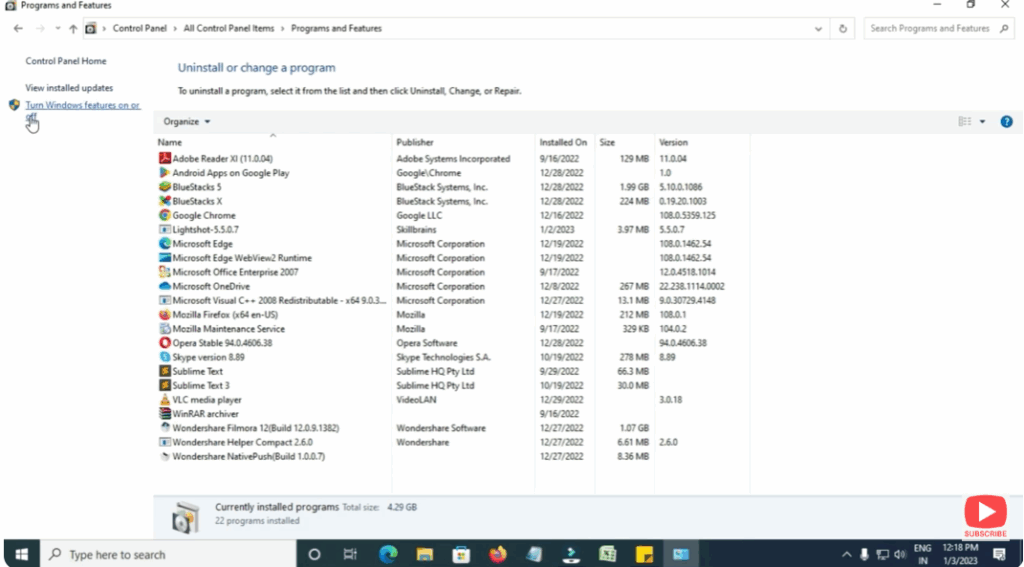
- Go to Control Panel → Programs → Turn Windows features on or off.
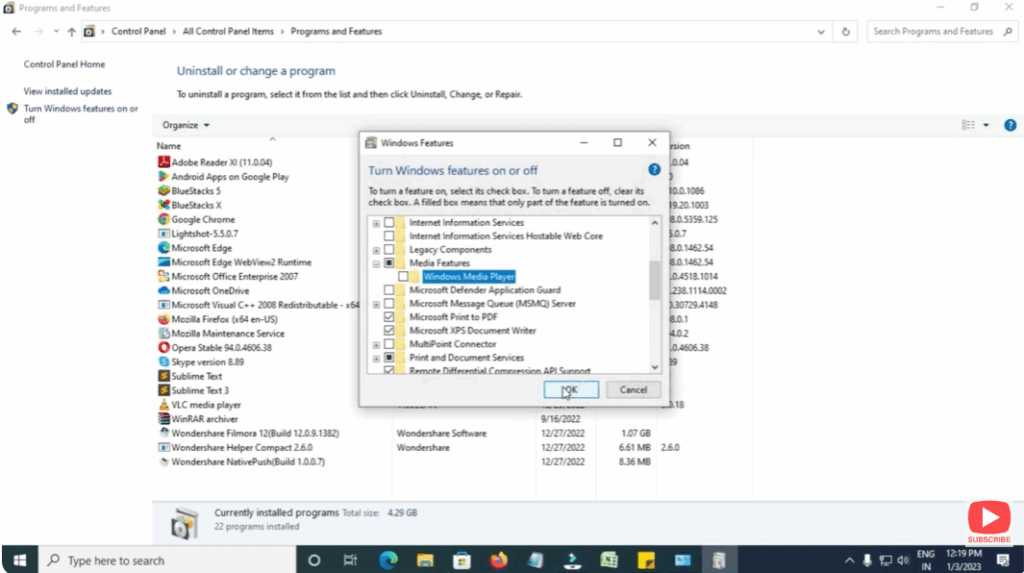
- Find Media Features → uncheck Windows Media Player → click OK → restart your PC.
- After reboot, go back and re-enable Windows Media Player by checking it again → restart again.
Conclusion
Windows Media Player is a solid, built-in option, but like any software, it can run into problems. By running troubleshooters, fixing codecs, re-registering DLLs, and even repairing system files, most issues can be resolved. If everything fails, switching to a more modern media player is a practical fallback.






