
Creating a moving background in PowerPoint adds dynamic visual appeal to your presentations using animated videos or effects that play continuously behind your content. This technique uses video backgrounds sent to the back layer with looping playback and custom themes in Slide Master for professional results. In this blog, you’ll learn easy step-by-step methods to insert motion backgrounds, fix layering issues, and create stunning animated themes that impress audiences.
✅Simple Steps to Make a Moving Background in PowerPoint
Use Video as Slide Background (Best for full motion, cinematic effect)
- Open PowerPoint and create (or go to) the slide you want to animate.
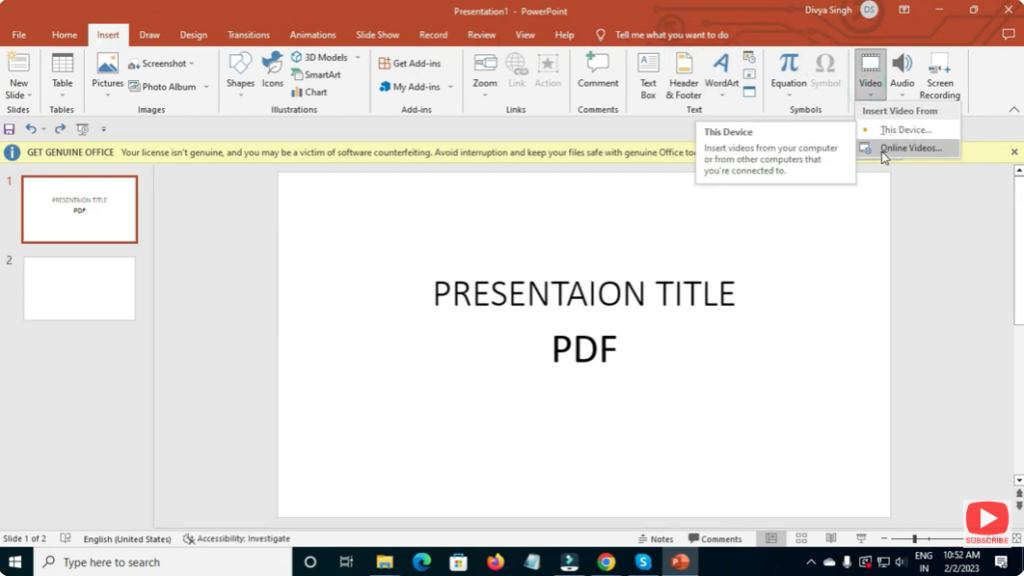
- Go to Insert → Video → This Device / Online Video, and choose a video file.
- Resize the video so that it covers the entire slide (or set it as background).
- In the video’s playback settings, set it to Start Automatically (or On Click, depending on when you want it to run). Optionally, set it to loop if you want continuous motion.
- Add your text or slide content on top — it will display over the moving background.
✅ Final Thoughts
Whether you want a bold cinematic intro, a subtle animated backdrop, or a creative motion-graphic presentation — giving your PowerPoint slides a moving background can significantly boost visual appeal and engagement.






