
The taskbar in Windows 11 is one of the most important parts of your computer—it helps you open apps, switch between programs, and check the time or notifications. But sometimes, the taskbar may stop working, freeze, or even disappear, leaving users frustrated. The good news is, this problem can usually be fixed with a few simple steps. In this beginner-friendly blog, we’ll explain in easy language how to fix the taskbar not working issue in Windows 11, so you can get your desktop back to normal quickly.
✅ Methods to Fix Taskbar in Windows 11
Here are several methods, listed from simple (fast) to more advanced (if simple fixes don’t work):
Method 1: Restart Windows Explorer
- Press Ctrl + Shift + Esc to open Task Manager.
- Under the Processes tab, find Windows Explorer.
- Right-click it → choose Restart.
- Wait a few seconds — your desktop and taskbar will reload.
This often fixes frozen or missing taskbar at once.
Method 2: Repair System Files with SFC + DISM
Corrupted system files may break shell components. To repair:
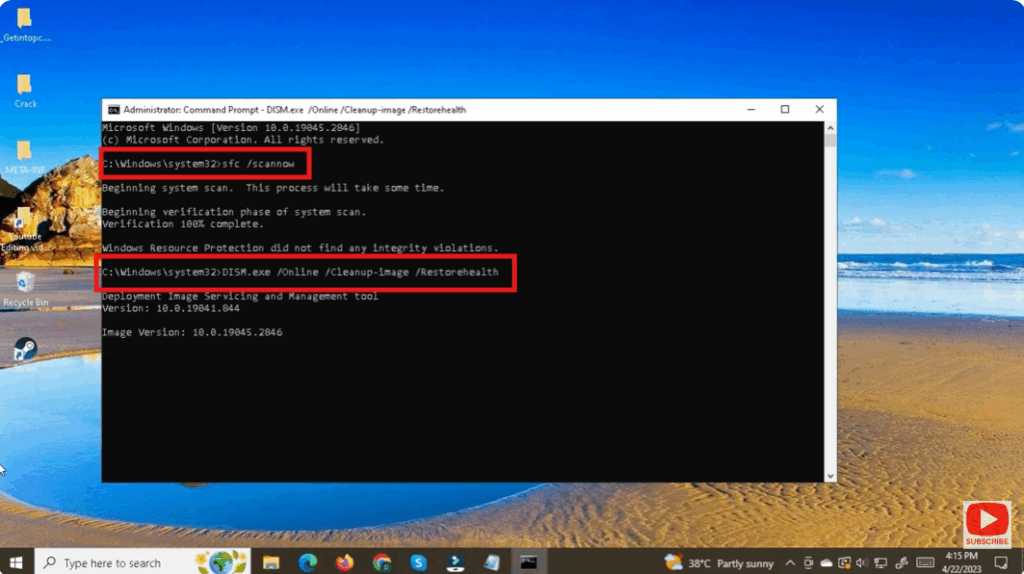
- Open Command Prompt (Admin) — press Win + S, type
cmd, right-click → Run as administrator. - Run:
sfc /scannowWait till it completes. - If problems persist, run:
DISM /Online /Cleanup-Image /RestoreHealth - After completion, reboot and check the taskbar.






